AI Coding Agent Orchestrator for Claude Code, Codex and OpenCode
An AI coding agent orchestrator turns a pile of terminal tabs into a small team. One lead agent plans the work, hands parts to other agents and checks what comes back, while you approve the steps that matter. This guide covers what an AI agent orchestrator does, what to look for in a multi agent coding tool, and how a Claude Code orchestrator can share a project with Codex and OpenCode on Windows, macOS and Linux.
What an AI coding agent orchestrator does
An orchestrator sits between you and the agents. You describe the goal once; the lead agent writes the plan, splits the work into parts, and decides which part goes to which teammate. Each part is a small job with a clear finish line: one group of files, one expected behaviour, one test that should pass.
While the parts run, the lead keeps an eye on them and picks up the results. It reads diffs, runs the tests and asks a teammate to fix what came back wrong. You stay in charge of the decisions that cannot be undone: merging into the main branch, changing a public interface, deleting data, spending money.
That split is the whole point. A single agent working alone has to hold the plan, the edits and the review in one context. An orchestrator keeps the plan in one place and lets parallel work happen in separate folders, so a long task stops depending on one session staying alive.
Why one terminal per agent stops working
Running one agent per tab works fine for one task. It breaks down as soon as you have more agents than attention.
- Too many tabs. You cannot see which window is waiting, which is stuck on a question and which finished long ago.
- Missed permission prompts. An agent that asks for approval and gets no answer simply waits. You notice it much later, when the task is far behind.
- Agents overwriting each other. Two agents editing the same file in the same folder do not merge politely. The last save wins and the other work disappears.
- Forgetting between sessions. Every new session starts blank. Decisions from yesterday, the file you settled on and the open question all have to be explained again, by hand.
- Usage limits. One agent can hit a limit mid-task while the others are idle. Without a queue and a reminder of when the limit resets, the whole pipeline stops at the slowest turn.
None of this is a model problem. It is a supervision problem: you become the message bus between agents, and your attention is the bottleneck.
What to look for in an AI agent orchestrator
A useful multi agent coding tool has to answer a few plain questions. Can I see what every agent is doing? Can I approve or deny in one place? Will parallel agents damage each other's files?
- Mix different agents. Each seat should be able to run a different agent and model, so you can plan on one vendor and edit on another.
- Worktree isolation. Parallel tasks should run in separate Git worktrees or branches, so two agents never write the same file at the same time.
- Live status. Active, waiting and done should be visible without reading terminal output. Blocked agents belong at the top of the list.
- One place for approvals. Permission requests should reach you as a notification you can answer, not as a line buried in a scrollback buffer.
- Shared memory. A new session on any agent should already know the last decisions, the files involved and the open threads.
- Your code stays local. Terminal output and prompts should not be uploaded to a dashboard you do not control.
- Operating system support. Check that the tool runs on the system you actually use: Windows, macOS or Linux, including the shell your agents expect.
How Foxpit orchestrates Claude Code, Codex and OpenCode
Foxpit is a desktop app that runs several coding agents across several projects at once. Each project gets a room in a 3D office building with its own team of agents; rooms in the background keep working while you fly between them. Inside a room, a lead agent called Fox plans the work, splits it into task cards with checklists, and hands a card to a teammate to start. Cards move from backlog to done as the work lands.
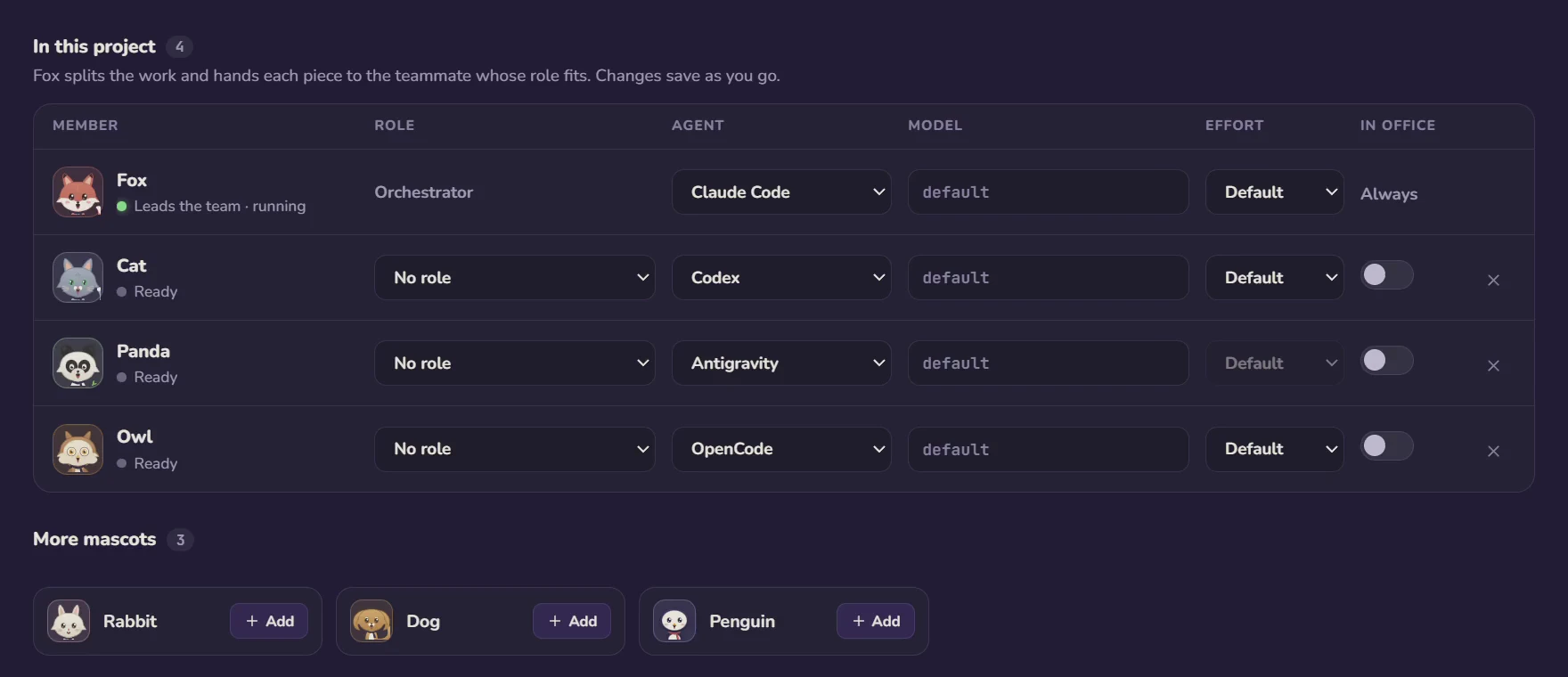
Fox is not tied to one vendor. Each seat can run a different agent and model, so a Claude Code orchestrator can hand a card to a teammate on Codex and another on OpenCode, and every agent reads the same project memory. Optional per-agent Git worktrees keep parallel work from colliding, and delivery cards show what changed, which tests ran and what the task cost. When an agent asks for permission, a desktop notification lets you approve or deny without hunting for the right window.
- Rooms and a lead. A project is a room with a team at their desks; Fox plans and assigns, you keep the final say.
- Different agent per seat. Fox on Claude Code, a teammate on Codex, another on OpenCode, all on one team with one shared memory.
- Worktrees and delivery cards. Optional isolation per agent, plus a card that lists files changed, test results and cost.
- Waiting at the limit. When Claude Code hits its 5-hour limit, Fox parks the turn, shows the reset time and sends "continue" by itself.
- Local by design. Code, prompts and terminal output stay on your machine; agent events travel over 127.0.0.1 only.
You can read more on foxpit.dev, or start with Getting Started to connect your agents and set up a team.
More on the pieces: running several Claude Code agents in parallel, splitting one task between agents, and Git worktrees for agent isolation.
Frequently asked questions
Is Foxpit an orchestrator or a terminal?
Both. Foxpit runs real interactive agent terminals side by side, and it also coordinates them: a lead agent called Fox plans the work, splits it into task cards and hands parts to teammates. You can use it as a plain terminal grid or let Fox run the team.
Can I mix Claude Code and Codex in one team?
Yes. Each seat in a team can run a different agent and model, for example Fox on Claude Code, one teammate on Codex and another on OpenCode. All of them share the same project memory, so a teammate does not have to be told what the other agents already decided.
Does my code leave my computer?
No. Code, prompts and terminal output stay on your machine, and agent events travel over 127.0.0.1 only. The app has no analytics or telemetry; it only checks your plan and GitHub for updates. Foxpit uses your own agent subscriptions or API keys.
Which operating systems are supported?
Windows 10 and 11 on x64, macOS on Apple Silicon, and Linux through an AppImage. Node.js is not required.
Put one agent in charge of the plan.