Claude Code Usage Limit Reached: What to Do
You are halfway through a refactor and Claude Code stops with a usage limit message. Here is what the limit actually is, what you can do right away, and how to set things up so the next limit does not stop your work.
How the Claude Code limit works
On a Claude Pro or Max subscription, Claude Code shares one usage allowance with Claude on the web and desktop. Usage is counted in a rolling session window of about five hours that starts with your first message, and paid plans also have weekly limits on top. When you run out, Claude Code tells you when the window resets.
What fills the window is not the number of messages but the amount of context sent with each one. A long session re-sends its whole history every turn, so the same question costs far more in hour three than in minute five. Test logs, large file reads and big diffs make this worse.
What to do right now
- Write down where you are. Before you switch away, ask for (or write) a five-line handoff: the goal, what is done, what is half done, the files involved and the next step. Without it, you will pay for the same context again after the reset.
- Check the reset time. If it is less than an hour away, it is often cheaper to review the diff so far and run the tests yourself than to start over somewhere else.
- Continue on another agent. Paste the handoff into OpenCode, Codex or another agent and let it finish the routine part. Keep the hard decisions for when Claude is back.
- Or switch billing. Claude Code can also run on an API key with pay-as-you-go pricing. That is useful for a deadline, but watch the cost of long sessions.
Tip: Keep the handoff in a file inside the repo (for example NOTES.md) instead of the chat. Any agent can read a file; no agent can read another agent's chat history.
How to hit the limit less often
- One task per session. Use
/clearbetween unrelated tasks and/compactwhen a long task has a lot of stale history. - Keep logs out of the context. Run noisy commands yourself or ask for only the failing lines, not the full output.
- Plan with Claude, type with cheaper models. Let Claude write the plan and review the result; give the mechanical edits, test runs and docs to a cheaper model. Our orchestration guide shows the prompt pattern.
- Pick the model per task. Use
/modelto drop to a lighter model for simple work instead of spending the top model on renames.
How Foxpit handles usage limits
Foxpit is a desktop app that runs Claude Code, Codex, OpenCode and Antigravity as one team. Limits are one of the main reasons it exists:
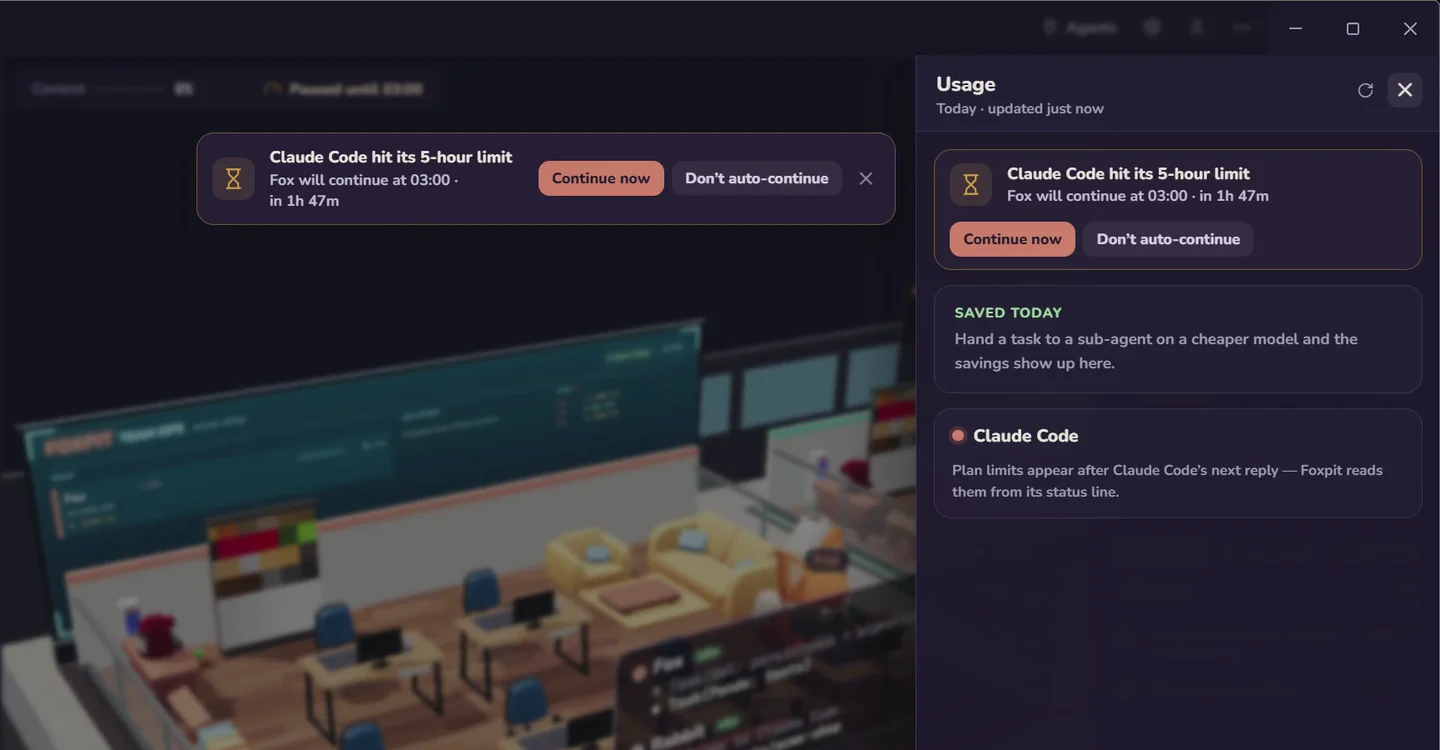
- Waits and resumes by itself. When the lead agent (Fox) on Claude Code hits its limit, Foxpit parks the turn, shows when it resets and sends "continue" at the reset. You can leave it overnight.
- The rest of the team keeps going. Each seat can run a different agent and model, so teammates on OpenCode or Codex keep working while Claude waits.
- No handoff to write. Every agent shares one project memory, so the next session already knows the decisions, files and open threads.
- Usage panel. One panel shows remaining quota and reset time for every agent that reports it.
Foxpit uses your own subscriptions; it does not resell or work around limits.
Frequently asked questions
When does the Claude Code usage limit reset?
On Pro and Max plans usage is counted in a rolling session window of about five hours that starts with your first message. Claude Code shows the reset time when you hit the limit. Paid plans also have weekly limits on top of the session window.
Can I keep coding while Claude Code is limited?
Yes. You can continue the same task with another agent such as OpenCode or Codex if you leave a short handoff note, or switch Claude Code to an API key with pay-as-you-go billing. In Foxpit, other teammates keep working while the limited agent waits.
Does Foxpit get around Claude usage limits?
No. Foxpit uses your own subscription and never resells or bypasses limits. It waits for the reset, sends "continue" at the reset time, and lets agents on other providers keep working in the meantime.
How do I use less of my Claude Code quota?
Keep sessions short and focused, clear or compact between unrelated tasks, keep long logs out of the context, and delegate routine edits and test runs to cheaper models while Claude plans and reviews.
Stop losing work to the 5-hour limit.