How to Split One Coding Task Between Several AI Agents
Starting several agents is easy. Making their work fit together is the hard part. A clean split gives every agent a piece it can finish alone, a way to prove it is done, and no reason to touch another agent's files. This guide covers the pattern, the cuts that work, and the merge at the end.
The lead and the team pattern
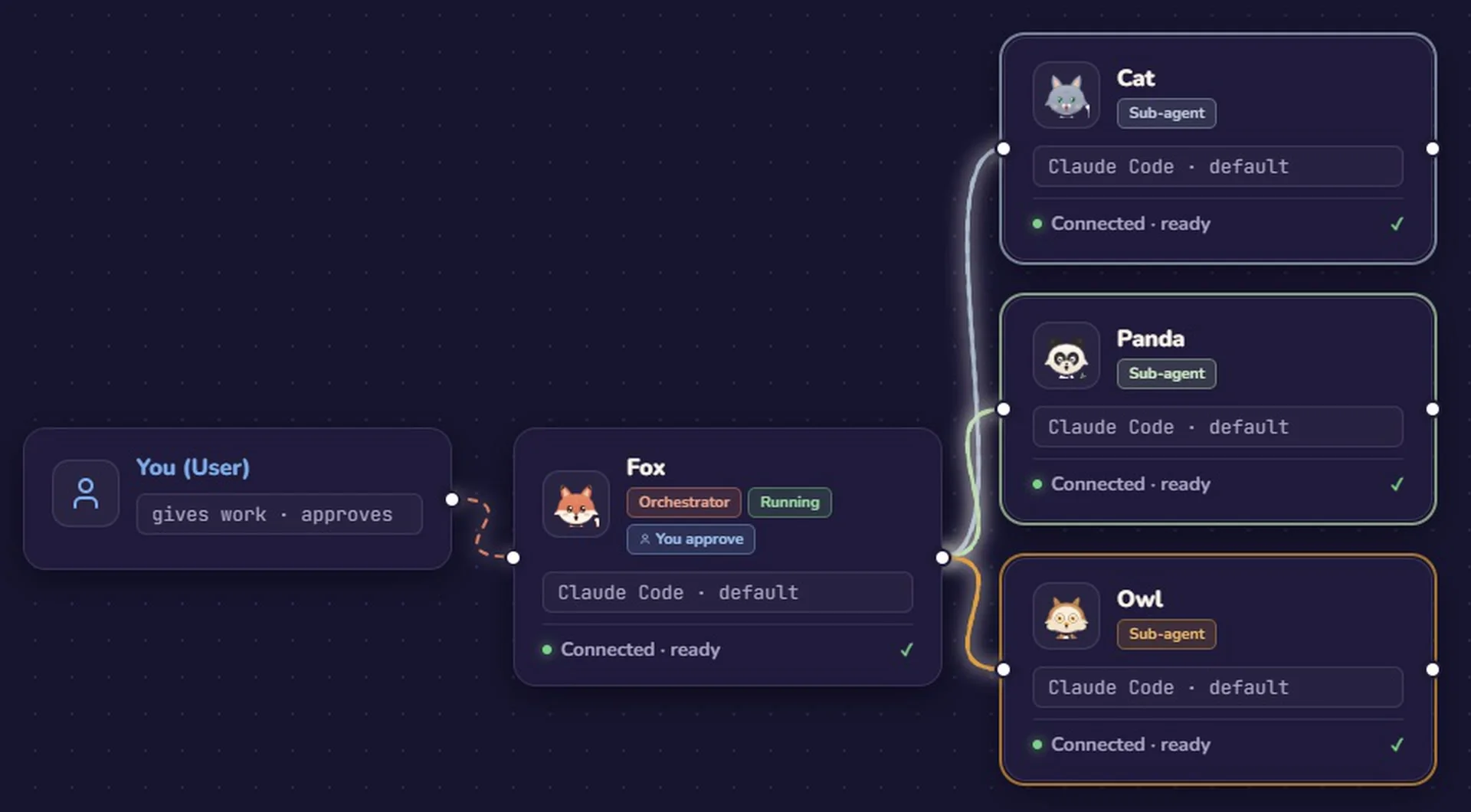
One agent is the lead. It reads the task, decides the parts, writes the shared interface, assigns the parts and reviews what comes back. The other agents are teammates: each one gets a part and works inside its own boundary. The lead can be Claude Code while a teammate runs Codex or OpenCode on a different model; the pattern does not depend on the vendor.
The point is not to make the lead do more typing. It is to keep decisions in one place. If every agent invents its own function name, error format or file layout, you get four plausible implementations that do not connect. The lead owns the plan and the seams; teammates own the work between the seams.
How to cut a task into good parts
A good part has four properties:
- One file group. The part owns a set of files and no other agent writes to them. "The export module and its test" is a file group. "Whatever the task needs" is not.
- A clear acceptance test. You can say what "done" means without asking the agent how it feels: a command runs, a test passes, an endpoint returns a known response.
- Its own test. The agent can prove the part works without waiting for the rest of the task to be finished.
- A reviewable size. If the diff is too large to read in one sitting, the part is probably two parts or a sign that the task needs a plan first.
Cut along boundaries that already exist in the code: a module, a command, an endpoint, a test suite. Avoid cutting by activity, such as "one agent writes the code and another writes the tests for the same code". That sounds parallel, but both agents need the same context and the same files, so they collide.
Prevent collisions before the first edit
A multi-agent failure is often not an intelligence failure. It is two agents editing the same file, or one agent changing a function that another agent is already calling. Four rules keep it from happening:
- One worktree per agent. Each agent works in its own Git worktree, so its changes stay separate until the lead merges them. Our worktree guide shows the setup.
- No shared files. Write the file owners into the task card. If two parts need the same file, the split is wrong; give the file to one owner.
- Fix the interface first. Before parallel work starts, land the shared types, function signatures, schema or API contract in one small commit. Teammates build against that contract instead of guessing.
- Give shared artifacts one owner. Lockfiles, generated files and config that every part touches should belong to one agent, or be changed by the lead between merges.
Dependencies are fine as long as they are explicit. If part B needs the function from part A, the lead writes the signature first. B can then build against the signature while A fills in the body.
Review and merge
The lead reviews each part before merging, and it reviews the diff, not the teammate's summary. A summary can be accurate and still miss a deleted branch or a test that was weakened to pass. Read git diff, run the tests yourself, and check whether the change does what the task card asked for.
- Check the diff, not the story. Look at the actual files and lines. If the agent says "tests pass", run them.
- Check that the tests still test something. A green suite is not useful if the failing assertion was removed. Compare the test changes with the behavior changes.
- Check the scope. If the changed file count is much larger than the task card, stop and ask why before merging.
- Merge one at a time. Merge a part, run the suite, then merge the next. Two merges at once make it impossible to tell which one broke the build.
How Foxpit splits the work
Foxpit follows this pattern directly. Fox, the lead agent, takes a goal and splits it into task cards with checklists. You assign a card to a teammate and start it; cards move from backlog to done as the work lands.
- Task cards as the contract. Each card carries its own checklist, so the teammate knows what "done" means and the lead has something concrete to review.
- Worktree isolation. Optional per-agent Git worktrees keep parallel agents from overwriting each other's files until the merge.
- Review material in one place. Delivery cards show the files changed, test results and cost, so Fox can inspect the result instead of reconstructing it from terminal scrollback.
Related guides: Git worktrees for AI agents and running several Claude Code agents in parallel.
Frequently asked questions
How many agents should work on one task?
Start with two or three and split only where file boundaries are clear. Every extra part adds integration work, so more agents is not automatically faster.
Do I need Git worktrees to split a task?
Not strictly, but without isolation two agents can edit the same working tree and overwrite each other. Foxpit offers optional per-agent Git worktrees so parallel agents keep their changes separate until the lead merges them.
What if two parts need the same file?
Do not split that way. Give the file to one owner, or land the shared interface first and let the other part only consume it. A file with two writers turns a parallel task into a manual merge.
Who reviews the work before it is merged?
The lead agent reviews each part against the real diff and the tests, then merges. In Foxpit, Fox plans the task cards, teammates do the parts, and Fox reviews the result.
Give every agent a part it can finish alone.